Image Enhancement Program
Free AI Image Enhancement Program Online
Skip bulky desktop installers with a zero-install browser image enhancement program for Windows, macOS, and mobile delivering adaptive 1×–2× neural clarity up to 16 MP, HDR tone balance, and lossless PNG export.
- Full-res PNG output
- 48 free credits, no card
- No app to install
- Deleted after 30 days
 Before
 After
Drag & drop your image here
or click to browse. Supports JPG, PNG, WebP (max 20 MB)
JPG · PNG · WebP up to 20 MB · Deleted after 30 days
Inspect Real 2× Browser-Enhanced Results
Drag any slider to inspect unaltered neural outputs across desktop saves, floodlit stadium shots, macro product thumbnails, and blurry travel photos—processed directly in your browser.


Sharpen compressed studio captures without bulky desktop installs
Re-saved Windows and Mac JPEGs lose crisp edge fidelity fast. Our online image enhancement program runs cloud neural inference in seconds without heavy installers.
- Restores brushed aluminum edges and subtle sheen on the closed studio laptop
- Recovers warm wood grain, leather notebook texture, and crisp espresso cup crema
- Clears blocky JPEG artifacts across sunlit monstera shadows without halos


Cut twilight floodlight haze and recover crisp night-turf detail
Harsh arena floodlights muddy shadows and wash out highlights. Acting like nimble HDR image software in your browser, one pass restores punchy contrast and crisp motion texture.
- Balances bright stadium floodlights while clearing milky glare across dark twilight stands
- Defines dewy emerald turf blades and crisp jersey folds on the sprinting player
- Strips blotchy high-ISO chroma noise in dark grass without waxy smoothing
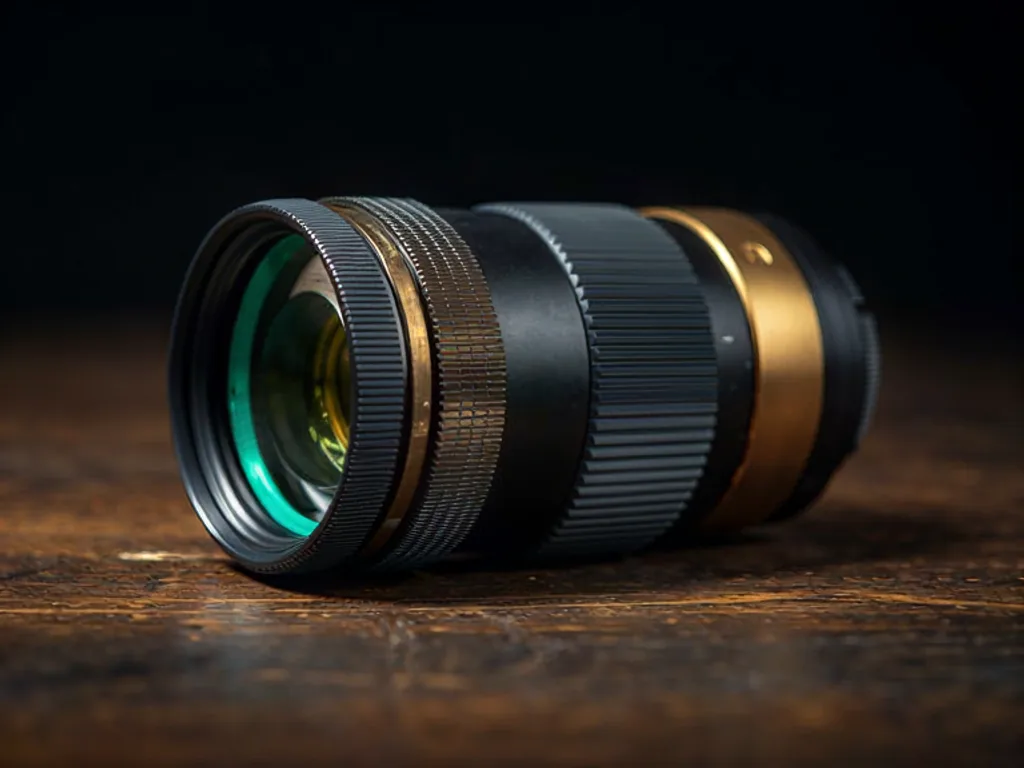
Turn low-res catalog thumbnails into zoom-ready product macros
Compressed vendor proofs flatten metallic ridges and optical glass. Run store graphics through this cloud image enhancer program to rebuild fine material texture before publishing.
- Reconstructs precision diamond-knurled brass and black barrel ridges on the vintage lens
- Clarifies emerald optical glass reflections with zero jagged sharpening rings
- Sharpens dark walnut table pores and studio contact shadows for 2× zoom


Rescue pixelated phone transfers and soft coastal architecture shots
Messaging apps compress vacation pictures into mushy squares. Drop soft travel saves into our enhance image software in Chrome or Safari to revive stone facades and waves.
- Defines terracotta roof tiles, whitewashed stone lighthouse walls, and crisp shutters
- Separates textured cliff rock faces from turquoise harbor foam cleanly
- Adaptively doubles smaller frames up to 16 MP for crisp 4K monitors
Why Choose Our Browser Image Enhancement Program
Zero-install Mac, Windows & mobile speed
Skip multi-GB .dmg and .exe downloads, GPU drivers, and loud fans. Cloud inference finishes in ~6 seconds in any modern browser.
Adaptive 1×–2× detail up to 16 MP
Smaller compressed pictures scale up to 2× (above 4K UHD's 8.3 MP), while large camera shots get clean noise reduction and sharp micro-contrast.
Transparent credits & 30-day auto-delete
Start with 48 free signup credits (no card required). Uploads use encrypted HTTPS and are kept privately in isolated storage for up to 30 days for support, then deleted automatically.
How it works
Upload any JPG, PNG, or WebP file
Drag a photo up to 20 MB from Windows Explorer, macOS Finder, or mobile storage directly into your browser.
Run one-click neural enhancement
Click Enhance Image so our image enhancement program strips JPEG blocks, lifts HDR tonal clarity, and rebuilds natural textures in ~6 seconds.
Inspect and download lossless PNG
Check before-and-after detail with the wipe slider, then export your restored picture as an uncompressed lossless PNG.
Best inputs and limitations
Works well on: soft or re-compressed Windows and Mac image saves, hazy HDR and stadium lighting shots, e-commerce product thumbnails, blurry travel pictures, messaging-app phone transfers, and JPG, PNG, or WebP files up to 20 MB.
Keep in mind: this visual image enhancement program restores photographs and graphics—it is unrelated to bass enhancer software for music equalizers or audio mixing. It also runs zero-install in your browser rather than as a local app or a better quality extension needing broad permissions; if you need an AI photo enhancer online and offline for airplane-mode batches of 500+ RAW files, a local desktop suite remains better suited.
Browser-Based Image Enhancement Program vs. Bulky Desktop Installers
Sharpening soft photos once meant downloading 4 GB mac photo enhancement software in a .dmg archive or installing heavy photo enhancement software for windows requiring a discrete GPU and background updaters. On thin laptops, locked office PCs, or older Intel and Apple Silicon Macs, local AI suites spin up fans and stall quick edits.
A cloud image enhancement program removes that setup friction. Remote GPUs process each pass inside Safari, Chrome, Edge, or Firefox—delivering the crispness of pro image enhancement software with zero disk bloat.
- Cross-platform parity: Run one picture enhancement software workflow across Windows 10/11, macOS, iPads, and phones.
- Zero GPU heat: Whether replacing mac photo enhancement software on a MacBook Air or Windows desktop tools on integrated graphics, runs finish in ~6 seconds.
- Always current: Unlike boxed enhance image software or static photo enhancing software needing manual patches, cloud inference stays up to date.
- Clean OS footprint: Enjoy free photo enhancement software trial power with no registry clutter or background daemons.
Adaptive 1×–2× Neural Detail, HDR Clarity & Stadium Floodlight Recovery
Basic sliders inside legacy photo improver software only push pixel-edge contrast. That crude sharpening exaggerates JPEG blocks, boosts indoor grain, and leaves bright halos around hair, roofs, and jerseys.
Our neural model separates genuine texture from compression noise across an adaptive 1×–2× scale up to 16 MP. Small thumbnails double cleanly while large camera files keep natural dimensions as soft focus vanishes—making this an ideal program to enhance photos with realistic eyelashes, metal grain, masonry, and fabric weave.
- HDR haze recovery: Like focused hdr image software, one pass lifts veiled contrast and balances harsh highlights without artificial glowing skies.
- Night sports lighting: Meet AI stadium lighting photography fix software speed in your browser—built to cut floodlight glare, define dewy turf, and clean night-game noise.
- Structure-aware fidelity: Working as reliable ai image enhancement software and enhance image software, it sharpens glass reflections and fine wood pores cleanly.
- Zero halo rings: Compared with older picture enhancement software, photo improver software, or aggressive software for photo enhancement, edges stay clean at 100% zoom.
Web Program vs. Chrome Extensions & Offline Desktop Workflows
Many users weigh a web image enhancement program against installing a browser plugin or buying local desktop tools. Knowing the security and workflow differences protects both your privacy and output quality.
A typical image enhancer extension or quality enhancer extension requests broad Chrome or Edge permissions to read every tab you open. Even an ai image enhancer free extension often breaks after browser updates and still uploads photos to remote servers—while failing completely on Mac Safari or mobile.
- No extension permissions: Launching this image enhancer program in a standard tab needs zero add-ons and works identically on Mac Safari, Windows Edge, Chrome, Firefox, and phones.
- Online speed vs. offline RAW queues: Cloud enhance image software wins for instant cross-device fixes without multi-GB weights; offline desktop ai image enhancer software still fits studios batch-processing hundreds of RAW files without Wi-Fi.
- Consistent desktop quality: Whether replacing mac photo enhancement software at home or quick photo enhancer software on the go, lossless PNG output stays identical.
- Safer than ad-bundled freeware: Skip risky photo enhancer free software or outdated free program to enhance photos downloads.
Transparent Credits, Watermark-Free PNG Exports & File Privacy
Many portals advertise free photo enhancement software for windows or macOS only to hide export caps behind surprise paywalls after a gigabyte install. Our image enhancement program keeps metering, previews, and privacy clear upfront.
Every new account includes 48 free signup credits valid for 7 days—no credit card required. Usage is metered at 12 credits per input megapixel (minimum 12 credits per photo), producing watermarked previews so you can inspect neural quality before upgrading.
- Flexible upgrades: Unlock watermark-free lossless PNG exports on new and existing runs with a 500-credit pack ($6.99 USD during our Holiday Sale, regularly $9.99, through December 30) or Pro (from $9.95/mo billed annually at $119.40 first year, or $19.99/mo monthly)—one-time packs never expire and work site-wide.
- Honest trial access: Test our free image enhancement software and free photo enhancer software workflow risk-free in your browser.
- Multi-device value: Teams wanting ai photo enhancement software, picture enhancement software, or software to enhance photo quality avoid per-machine seat keys.
- Private 30-day deletion: Uploads travel over HTTPS, process in isolated storage strictly for your PNG, stay private for up to 30 days for support, then auto-delete.
Choosing the Right Specialized SuperResolution Tool for Each Photo
A versatile image enhancer program resolves everyday blur, compression, and tonal haze cleanly, yet specialized flaws benefit from dedicated pipelines. Because your credits work across every SuperResolution page, you can pair each shot with the exact software for photo enhancement or restoration it requires.
- Everyday one-click touch-ups: For fast general cleanup without comparing OS desktop tools, use our streamlined AI Photo Enhancer.
- Heavy high-ISO grain at 1× size: When night shots suffer mainly from color speckle rather than blur, start with AI Photo Denoise.
- Dark or backlit shadows: Lift severe underexposure evenly before sharpening with AI Image Brightener.
- Torn or scratched physical scans: Vintage prints with creases, dust, or stains belong in Damaged Photo Repair.
- Print sizing & 8K enlargements: Choose Increase Photo Resolution for stepped 2×/4× 4K and 300 DPI sizing up to 25 MP, or flagship AI Super Resolution for 2×–16× upscaling up to 34 MP / 8K.
Whether you need dependable image enhancement software, ai image enhancement software, ai image enhancer software, picture enhancement software, enhance image software, or fast software to improve photo quality, picking the focused tool yields cleaner results faster.
Comparing Browser Programs, Desktop AI Suites, Editors & Extensions
Comparing a zero-install image enhancement program against desktop suites, pro editors, and plugins highlights clear differences in hardware load, speed, and install friction:
| Enhancement Workflow | OS, GPU & Install | AI Quality & Speed | Pricing & Friction |
|---|---|---|---|
| SuperResolution Browser Program (Windows/Mac/Mobile) | Any browser on Windows, macOS, iOS & Android; zero download or local GPU | Adaptive 1×–2× neural clarity up to 16 MP, HDR haze cleanup & denoise in ~6s | Zero install; 48 free preview credits, credit pack or Pro for clean PNGs |
| Desktop AI Suites (Topaz / Luminar) | Multi-GB .dmg/.exe installer; discrete GPU or Apple Silicon recommended | Strong offline batch queues, slower on thin laptops without dedicated VRAM | Upfront desktop license or annual renewal plus large model updates |
| Pro Photo Editors (Photoshop / Lightroom) | Heavy Windows/macOS suite install with high RAM and scratch-disk use | Deep manual layers and RAW grading; sharpening requires manual tuning | Ongoing creative subscription and steeper workflow for quick fixes |
| Browser Extensions (Chrome/Edge Plugins) | Desktop Chrome/Edge only; asks broad site permissions, not on mobile Safari | Inconsistent models; many cap resolution or wrap simple contrast filters | Freemium limits, permission prompts, and frequent browser breakage |
| Built-In OS Editors (Mac Photos / Windows Photos) | Pre-installed on macOS or Windows with zero setup, single-OS lock-in | Quick basic sliders, but cannot reconstruct lost texture or strip blur | Included free with OS, lacks cloud neural super-resolution |
Simple, Transparent Pricing
Choose the plan that fits your needs. New users get 48 free credits on signup.
Black Friday SaleEnds December 30. Discounts apply automatically at checkout.
Pro
Everything, one simple plan
$119.40 for the first year, then $199/year
- Up to 16x upscale
- Instant processing
- Ultra HD output
- Credits never expire
- Priority support
- Commercial license
Credit pack
Top up anytime — credits never expire
- No subscription needed
- Credits never expire
- Works on any account
Frequently Asked Questions
Does this image enhancement program work on Mac and Windows without installing software?
Yes. This image enhancement program runs directly in Safari, Chrome, Edge, or Firefox on macOS (Apple Silicon and Intel), Windows 10/11, iOS, and Android. You get results rivaling mac photo enhancement software and photo enhancement software for windows with zero .dmg or .exe installs.
Is this free photo enhancement software really free to try, and how do credits work?
Yes. Every new account receives 48 free credits on signup (no credit card required) to generate real watermarked previews on your own images. To download clean, watermark-free full-resolution PNGs, pick up a one-time 500-credit pack for $6.99 USD during our Holiday Sale (30% off $9.99 through December 30, never expires) or upgrade to Pro from $9.95/mo billed annually ($119.40 first year, 40% off $199/yr) or $19.99/mo monthly.
Why use a web image enhancer program instead of a Chrome extension?
A dedicated browser image enhancer program avoids giving third-party extensions permission to read every website you visit. It works identically across Mac Safari, Windows Edge, Chrome, and mobile with full cloud GPU inference and lossless PNG export.
Can I use it offline, or when is desktop software better for RAW batches?
Cloud GPU inference requires an internet connection. If you edit offline on flights or batch-process 500+ studio RAW files locally without Wi-Fi, desktop image enhancement software or local photo enhancing software fits better; for fast cross-device fixes, our browser program is much quicker.
How does it improve hazy HDR scenes and bright stadium lighting shots?
Instead of harsh global sharpening that blows out floodlights, our neural pipeline separates glare and compression noise from real texture—delivering balanced contrast like nimble picture enhancement software while preserving clean stadium lighting and turf detail.
Can I purchase photo enhancer AI Mac access without downloading a heavy app?
Yes. Sign in from Safari or Chrome as your browser-based mac photo enhancer, test 48 free signup credits on your own photos, and unlock watermark-free PNG exports anytime with a one-time credit pack or Pro plan usable across Mac, Windows, and mobile.
What image formats and sizes are supported, and are my uploads kept private?
Upload JPG, PNG, or WebP files up to 20 MB; smaller photos scale adaptively up to 2× (16 MP cap) and download as lossless PNGs. Transfers use encrypted HTTPS, files stay in isolated private storage for up to 30 days for support, then auto-delete.