AI Denoise
Free AI Denoise Tool for Grainy Photos
One-click online AI denoise tool that strips high-ISO luminance grit, magenta-green chroma blotches, JPEG blocks, and 35mm film grain at native 1× pixel dimensions — exporting lossless PNG files in your browser.
- Full-res PNG output
- 48 free credits, no card
- No app to install
- Deleted after 30 days
 Before
 After
Drag & drop your image here
or click to browse. Supports JPG, PNG, WebP (max 20 MB)
JPG · PNG · WebP up to 20 MB · Deleted after 30 days
See How Our AI Denoise Engine Cleans Grainy Captures
Slide any scene below to inspect real native 1× outputs across twilight canals, dusk wildlife, dim jazz stages, and 35mm workshop scans.
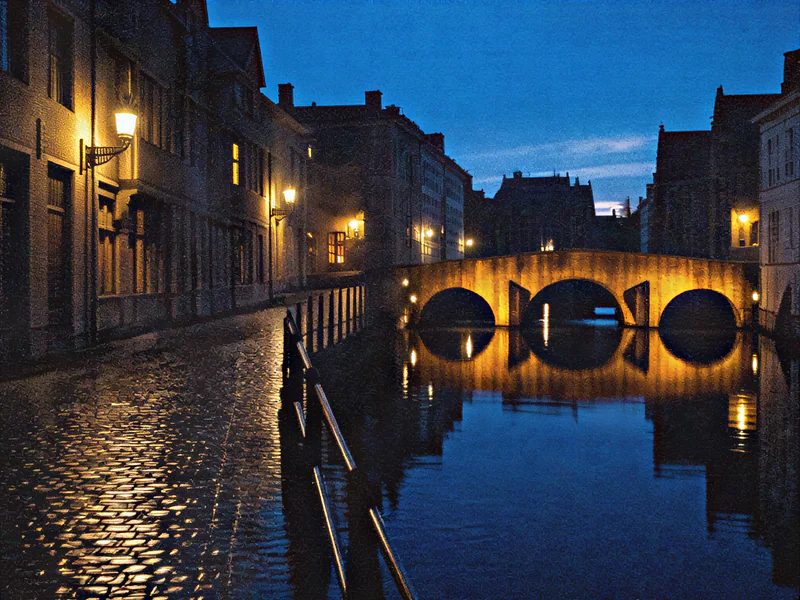
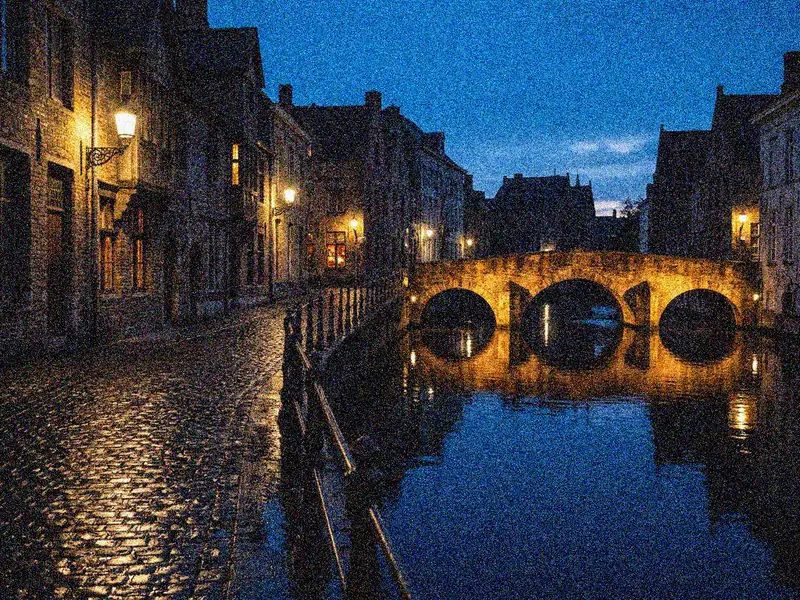
Clean blue-hour canals and wet cobblestones without smearing brick mortar
Handheld twilight architecture pushes sensors to ISO 6400, scattering color speckle across deep skies and wet stone. One neural pass clears the shadows while keeping masonry crisp.
- Smooths blotchy chroma speckle across the deep indigo twilight sky and canal water
- Preserves crisp mortar joints along the arched stone bridge and shadowed brick facades
- Holds sharp edges on wrought-iron railings and antique streetlamps over wet cobblestones
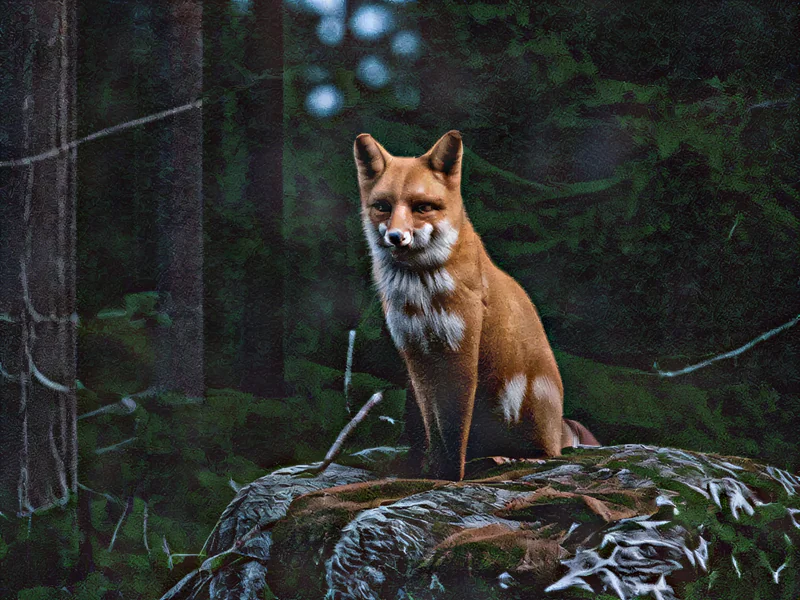
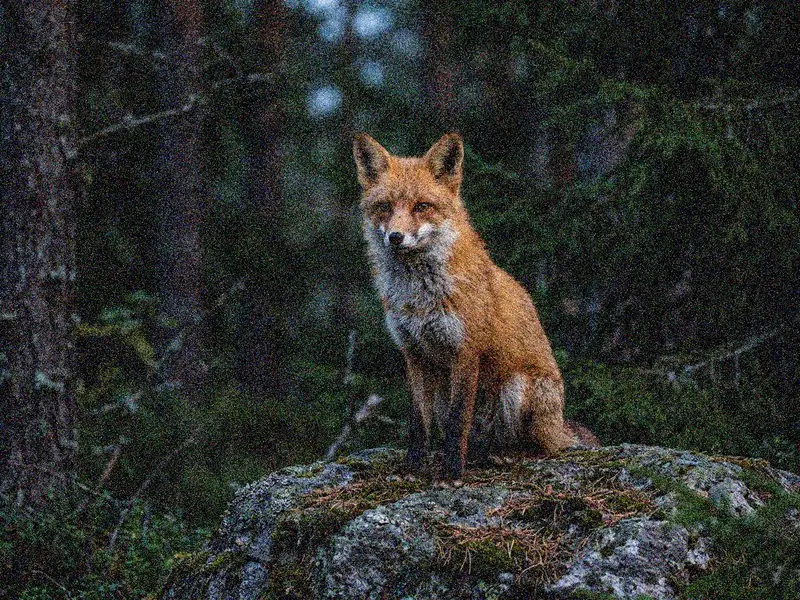
Strip high-ISO speckle from dusk wildlife frames while keeping fur intact
Fast shutters under forest canopy demand steep ISO settings that chew through fine hair. Structure-aware cleanup separates random grit from organic strands so coats stay sharp.
- Separates fine rufous fur strands and crisp white whiskers on the alert wild red fox
- Keeps bright amber eyes razor-sharp while clearing grit off the mossy granite boulder
- Tames uneven color speckle across the deep evergreen pine forest bokeh backdrop


Rescue ISO 12800 jazz stage portraits under amber and cobalt spotlights
Dim venues mix colored spotlights with dark shadows that trigger ugly banding. Neural cleanup clears stage static without turning skin waxy or flattening brass reflections.
- Clears dense ISO 12800 luminance grit across dark stage shadows and cobalt-blue rim light
- Retains brushed-brass luster and warm amber reflections along the alto saxophone
- Holds woven texture in the saxophonist's dark tweed jacket and natural facial pores
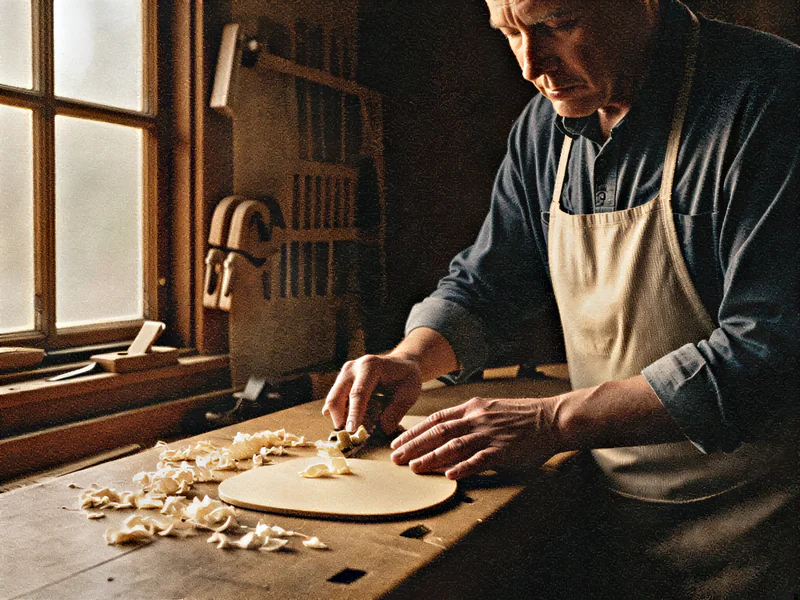
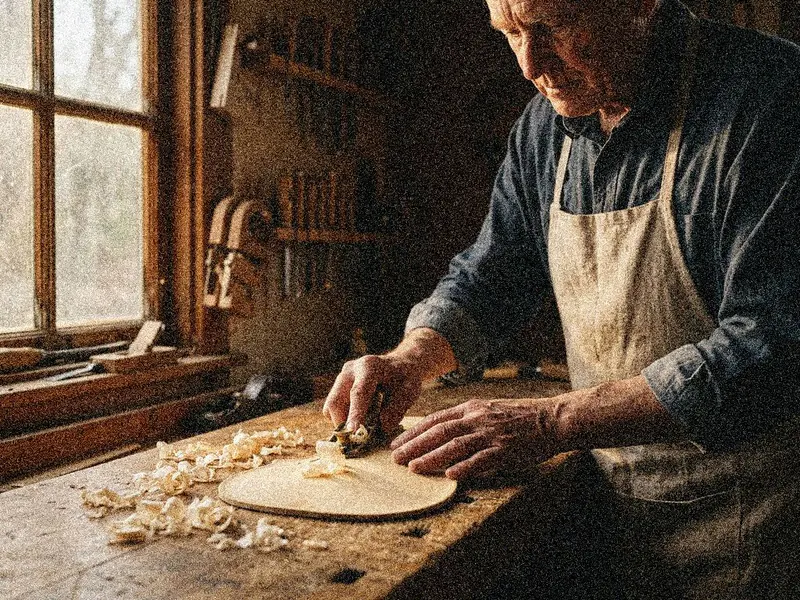
Tame heavy 35mm film grain on workshop scans without plastic skin
High-speed negative stocks scatter coarse silver-halide clumps across faces and timber. Native 1× processing calms intrusive grain in photos while respecting documentary texture.
- Calms coarse 35mm negative clumping across shadowed walls and warm window falloff
- Preserves fine spruce wood lines on the carved violin top plate and oak workbench
- Keeps weathered creases in the elderly luthier's hands, linen apron, and brass thumb plane
Why Use an AI Denoise Tool Instead of a Spatial Blur Slider?
Zero waxy skin or smeared fur
Replaces blunt spatial averaging with neural structure modeling, clearing luminance grit and chroma blotches while keeping pores, whiskers, eyelashes, and weave crisp.
Native 1× scale & lossless export
Runs SeedVR at strict 1× scale (~6s), preserving exact original pixel dimensions with no forced upscaling, no cropping, and uncompressed PNG download.
High-ISO, JPEG & 35mm scans
Cleans night captures, telephoto wildlife, mirrorless RAW exports, social re-saves, and analog film scans right in any browser with zero setup.
How it works
Upload JPG, PNG, or WebP
Drop a noisy photo, grainy image, stage portrait, or 35mm scan (20 MB max) into the browser uploader.
Click Denoise Image (~6s)
Start the native 1× pass to strip Poisson shot grit, chroma blotches, and 8×8 blocks automatically.
Inspect Denoised preview & save
Drag the before/after comparison slider across your Denoised preview, then save your full-resolution lossless PNG.
Best inputs and limitations
Works well on: high-ISO night cityscapes, dim indoor phone pictures, telephoto wildlife and sports shots, ISO 6400–12800 concert stages, compressed social JPEG files, mirrorless RAW-to-JPG/PNG exports, and grainy 35mm analog film scans.
Keep in mind: this tool strips unwanted photographic noise rather than acting as an "add film grain", "grainy photo effect", or "white noise" generator; it handles still JPG, PNG, and WebP files (20 MB max) rather than MP4/MOV video timelines in DaVinci Resolve, Premiere Pro, or After Effects; it is not certified for diagnostic medical X-ray imaging; and severely blurred shots or torn vintage paper scans belong in AI Photo Enhancer or AI Old Photo Restoration.
Physics of Noise in Photography: Shot Grit, Chroma Blotches & JPEG Blocks
Understanding noise in photography explains why basic blur sliders fail. Real photographic noise stems from three physical sources: Poisson photon shot grit (random light-arrival variance in dim shadows), Gaussian sensor read static plus magenta-green chroma blotches from high analog gain, and 8×8 JPEG compression blocks added by messaging apps — alongside speckled micro-artifacts from AI generators.
Spatial blur filters rely on a single denoising strength slider that averages neighboring pixels blindly. Push it far enough to remove noise from image shadows, and fine eyelashes, stone mortar, or stubble melt into waxy sheen. An AI denoise network models real surface statistics instead, separating stochastic speckle from true edges so tricky frames stay crisp. For missed focus blur or beauty skin edits, switch to our clarity or portrait tools.
How to Denoise Across iPhone, Android, Lightroom, Capture One, Topaz & Web
Each editing stack approaches image noise reduction differently depending on sensor pipeline, GPU hardware, and file type:
- iPhone & iPad: Wondering what does noise reduction do on iPhone photos? In Apple Photos → Edit, the slider smooths luminance over Deep Fusion JPEGs — gentle tweaks (+15 to +25) calm dusk skies, while heavy values soften eyebrows and hair.
- Android & Mobile Portraits: Pixel Night Sight and Samsung Gallery merge multi-frame bursts, yet cropped indoor zoom frames or WhatsApp re-saves still develop chroma blotches needing dedicated photo noise reduction.
- Lightroom, Capture One & Topaz Desktop: Weighing Topaz Denoise AI vs Lightroom comes down to pipeline. Lightroom targets Bayer and X-Trans RAW DNGs on desktop GPUs; Capture One pairs camera ISO profiles with quick luminance controls; Topaz handles heavy offline batches — all needing multi-GB installs and paid licenses.
- 1-Click Browser AI Denoise: Whenever you want to remove noise from photo online free of local installs, our AI image denoiser runs SeedVR at native 1× (~6s) on JPG, PNG, or WebP uploads.
Workflows for Night, Wildlife, Mirrorless Exports & 35mm Film — Clean Before Upscale
Every shooting genre leaves a signature grit pattern. Night cityscapes gather chroma mottle at ISO 6400; dusk wildlife demands 1/1000s shutters; jazz stages mix tungsten and cobalt LEDs at ISO 12800. Mirrorless APS-C and Micro Four Thirds cameras — including Sony a6700, Fujifilm X-S20, and Lumix G95 — capture crisp optics, yet high-ISO exports still show fine luminance fuzz. Convert 12/14-bit ARW, RAF, or RW2 negatives to lossless PNG or 95%+ JPG first, then run a quick cleanup pass here. The same denoise photo workflow lets analog shooters remove grain from photo scans of Portra 800, Tri-X 400, or CineStill 800T without losing authentic micro-contrast.
Step order matters whenever you fix grainy photos for print. Lift severely underexposed shadows in our brightener first so dark edges emerge, then run native 1× denoise here BEFORE enlarging. Upscaling a gritty file early magnifies tiny speckles into fake stippling, whereas passing a clean native output into our 2×/4× upscaler, 300 DPI print tool, or 8×–16× engine keeps gallery prints razor-sharp.
Supported Formats, Opposite-Intent & Scope Boundaries
This browser AI denoiser accepts still JPG, PNG, and WebP files up to 20 MB in Chrome, Safari, Edge, and Firefox. SeedVR runs at strict 1× scale — keeping exact input pixel width and height with zero forced resizing or cropping — and saves lossless output so fresh compression ringing never returns. Export Apple HEIC or camera RAW (CR3, NEF, ARW, RAF, RW2, DNG) to PNG or high-quality JPG beforehand.
Important scope boundaries: this image denoiser removes unwanted grit — it is NOT an "add film grain", "grainy photo effect", or "white noise" overlay generator. It cleans still frames rather than MP4/MOV video timelines in DaVinci Resolve, Premiere Pro, or After Effects (see our video guide, though exported still frames work fine). Finally, this photography tool is not certified for diagnostic medical X-ray analysis, and torn or scratched vintage paper scans belong in Old Photo Restoration.
Transparent Metering: 48 Free Credits, 12 Credits/MP & 30-Day Auto-Delete
Every new account receives 48 free signup credits (valid 7 days, no credit card needed) so you can denoise your own tricky captures right away. Usage meters by source area at 12 credits per input megapixel (12-credit minimum) — up to four watermarked previews on files at or below 1 MP, with exact cost shown before running.
For watermark-free lossless exports ready for clients, editorial publishing, or print labs across our suite, pick a 500-credit pack ($6.99 USD during our Holiday Sale, regularly $9.99, through December 30) or Pro (from $9.95/mo billed annually at $119.40 first year, or $19.99/mo monthly). Uploads and finished outputs transfer over encrypted HTTPS, never train AI models, and are kept privately for up to 30 days for support, then deleted automatically.
Browser AI Denoise vs. Phone Sliders vs. Lightroom & Topaz Desktop
Compare our native 1× denoiser against built-in phone sliders and desktop RAW suites across six practical criteria:
| Criterion | This AI Denoise Tool | Phone / OS Slider | Lightroom & Topaz Desktop |
|---|---|---|---|
| Skin, Fur & Edge Detail | Neural modeling strips grit while keeping pores, whiskers, and mortar sharp | Spatial blur smears eyelashes, weave, and hair into waxy sheen | Strong detail retention on desktop GPU with manual tuning |
| Chroma & JPEG Artifacts | Clears magenta-green color blotches and 8×8 compression blocks in one click | Targets mild luminance grain; weak on heavy chroma mottle or blocks | Effective when pairing color controls, RAW denoise, and de-blocking |
| Resolution & Export | Strict native 1× original pixel dimensions (no forced upscale or crop), lossless PNG | Native gallery dimensions, often re-saved as lossy JPG or HEIC | Full camera dimensions exported to DNG, TIFF, PNG, or JPG |
| Speed & Setup | ~6s browser pass at 1× scale; zero downloads or GPU needed | Instant built-in slider inside Apple Photos or Android Gallery | Multi-GB desktop install; needs modern GPU for fast passes |
| Input Formats | Still JPG, PNG, WebP up to 20 MB (export RAW/HEIC first) | Native phone HEIC, JPG, and PNG captures | Bayer/X-Trans RAW (ARW, CR3, NEF, RAF, DNG), TIFF, JPG |
| Pricing & Access | Requires internet connection; 48 free preview credits on signup, then $6.99 USD credit pack (Holiday Sale, reg. $9.99) or Pro from $9.95/mo ($119.40 first yr) for watermark-free PNGs | Included with iOS and Android galleries | Paid recurring subscription or desktop license |
Simple, Transparent Pricing
Choose the plan that fits your needs. New users get 48 free credits on signup.
Black Friday SaleEnds December 30. Discounts apply automatically at checkout.
Pro
Everything, one simple plan
$119.40 for the first year, then $199/year
- Up to 16x upscale
- Instant processing
- Ultra HD output
- Credits never expire
- Priority support
- Commercial license
Credit pack
Top up anytime — credits never expire
- No subscription needed
- Credits never expire
- Works on any account
Frequently Asked Questions
Is this AI denoise tool free to use?
Yes. Every new account receives 48 free credits on signup (no credit card required) to generate real watermarked previews on your own images. To download clean, watermark-free full-resolution PNGs, pick up a one-time 500-credit pack for $6.99 USD during our Holiday Sale (30% off $9.99 through December 30, never expires) or upgrade to Pro from $9.95/mo billed annually ($119.40 first year, 40% off $199/yr) or $19.99/mo monthly. Free signup credits stay valid for 7 days and meter at 12 credits per input megapixel (12-credit minimum), providing up to four watermarked previews on uploads at or below 1 MP.
Will AI denoise make faces look waxy or change my pixel resolution?
No. SeedVR runs at strict native 1× scale (~6s), keeping exact original pixel width and height with zero forced upscaling or cropping. Because it models fine structure instead of applying blanket blur, skin pores, stubble, fur strands, and masonry stay crisp in the lossless download.
What does noise reduction do on iPhone photos versus browser AI denoise?
Apple Photos applies a spatial luminance slider over Deep Fusion files. Mild tweaks calm twilight skies, yet pushing further quickly softens eyelashes and hair. Running an exported JPG or PNG through our neural model clears magenta-green chroma blotches and ISO grit while keeping micro-texture.
How does this compare to Topaz Denoise AI vs. Lightroom AI Denoise?
Lightroom excels inside a desktop RAW DNG catalog, and Topaz suits heavy offline batches — both needing multi-GB installs, strong GPUs, and paid licenses. Our browser engine gives you instant one-click native 1× cleanup on JPG, PNG, and WebP files from any laptop or phone in ~6 seconds.
Should I denoise a grainy shot before brightening or upscaling?
If a capture is severely underexposed, lift shadows first in AI Image Brightener so edge detail becomes visible, then run native 1× denoise here before enlarging. Cleaning ISO speckle prior to 2×/4× enlargement in AI Image Upscaler or 8×–16× super-resolution stops upscalers from magnifying grain into false texture.
Can this add film grain, clean DaVinci Resolve or Premiere videos, or handle medical X-rays?
No. This tool removes unwanted grain rather than adding synthetic grainy photo effects or white-noise overlays. It cleans still JPG, PNG, and WebP files (up to 20 MB) rather than MP4/MOV timelines in DaVinci Resolve, Premiere Pro, or After Effects (exported still frames work fine), and it is not certified for diagnostic medical X-ray imaging. For torn vintage prints, use AI Old Photo Restoration.
Are uploaded files private and cleared for commercial licensing?
Yes. Uploads and Denoised files transfer over encrypted HTTPS, never train AI models, and are kept privately for up to 30 days for support, then deleted automatically. Watermark-free downloads unlocked via a credit pack or Pro carry commercial usage rights for editorial, client, and print work.