How to Make Photos Less Grainy: 6 Proven Denoise Fixes
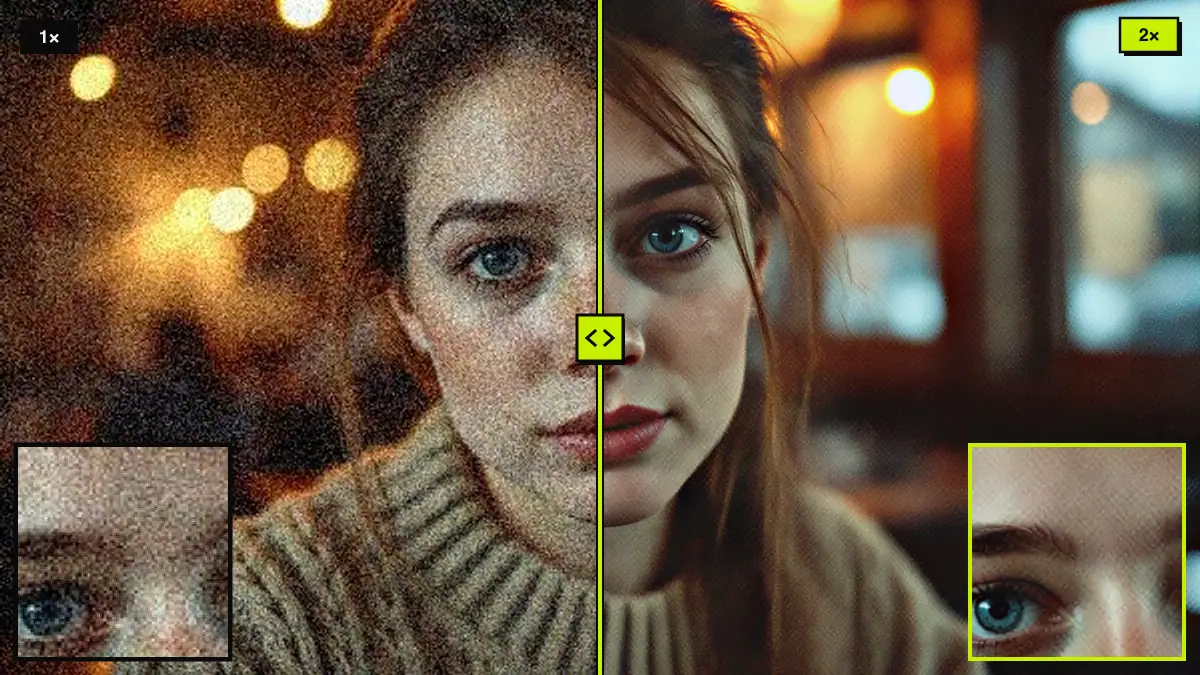
Snap a portrait in a warm tungsten cafe, freeze a concert guitarist, or track wildlife at dusk: on a six-inch phone screen, it looks tack-sharp. Zoom to 100% on a laptop, and shadows dissolve into magenta-green blotches while cheeks vanish under sandy static. Wondering why do my photos look grainy in dim light comes down to photon physics, not faulty glass.
For years, figuring out how to make photos less grainy meant an ugly compromise: push a smoothing slider far enough to calm speckled walls, and skin turned into poreless wax. Modern neural models end that trade-off by separating random sensor static from real structure — preserving freckles, eyelashes, catchlights, cable-knit wool, and fur barbs.
Below, we cover how to make a photo less grainy plus how to fix grainy photos end to end: sensor SNR math, exact denoise meaning, six workflows compared (including our dedicated native 1× AI Image Denoiser alongside our 1-click AI Photo Enhancer with 48 free signup credits and no card required), Lightroom, Photoshop, and mobile slider numbers, and 2026 synthetic AI tell-tales.
What Is Image Noise? Luminance, Chroma, JPEG Blocks & Film Grain
Answering what is image noise and what is noise in a photo starts at silicon photodiodes. Every exposure is a signal-to-noise ratio (SNR) contest between captured photons (signal) and random photon plus heat variance (static). Whenever photographers ask why are my photos so grainy or why are my pictures grainy indoors, photon starvation is why:
- Sensor area: A
1/1.3"phone sensor (~72 mm²,~1.2 µmpixels) gathers far fewer photons than APS-C (~370 mm²) or Full Frame (864 mm²,~12×larger), hitting its SNR floor early. - High ISO (
ISO 1600–12800) at1/250s–1/1000s: Fast shutters freeze action but limit light. RaisingISO 100toISO 6400applies64×(6 stops) voltage gain to weak signal and static alike. - Shadow pushing (
+2 to +3 EV): Underexposing at base ISO and lifting shadows+2.5 EVlater boosts quantization floors identically — explaining why does my photo look grainy and why do my pictures look grainy at low ISO.
Before choosing how to make photos less grainy, check 100% zoom to identify the defect:
- Luminance grain: Fine monochrome grit from Poisson shot math ($\sqrt{N}$). Keeping
10%–15%faint luma texture keeps skin organic. - Color (chroma) speckle: Magenta-green blotches from Bayer demosaicing boosting Gaussian read variance under
2700Kbulbs. Strip chroma blotches100%first in how to remove grain from photos. - 8×8 JPEG mosquito blocks: Chat apps quantize
8×8tiles, adding crunchy halos and blocky steps that need artifact-aware cleanup for how to fix grainy images. - 35mm silver-halide film grain (
ISO 400 / 800): Organic metallic silver clusters (Portra 800,HP5 Plus). For scanned vintage prints combining film wear with physical dust or creases, use AI Old Photo Restoration.
Denoise Meaning: What Is Denoising & Spatial Blur vs. Neural AI
Search denoise meaning, what does denoise mean, or what is denoise, and the engineering definition is clear: isolating random luminance and chrominance jitter from true scene structure (edges, gradients, weave). Practically, what does denoise do — and what does denoising do mathematically — is calm pixel speckle without shifting exposure or geometry.
Whether menus frame what is noise reduction in photography or beginners search "what is reduce image noise", tools span two generations:
1. Spatial Blur Filters (Median & Bilateral Sliders)
Legacy sliders average 3×3 or 5×5 pixel windows up to an edge threshold. Because pores, eyebrows, and wool fibers are low-contrast, pushing Luminance past 40–50 collapses that boundary — smearing faces into wax when testing how to make photos less grainy or how to make a photo less grainy manually.
2. Neural AI Reconstruction (Poisson-Gaussian Networks)
Modern what is denoising uses convolutional, transformer, and diffusion priors trained on clean ISO 100 captures paired with Poisson-Gaussian shot/read static and 8×8 JPEG blocks. Recognizing iris rims, wool twists, fur barbs, and type lets AI strip static while holding micro-contrast — solving how to fix a grainy photo and how to reduce image noise cleanly. See our photo quality enhancement guide for full tonal workflows.
How to Fix Grainy Photos: 6 Proven Methods Compared
Picking how to make photos less grainy depends on whether you hold 14-bit RAW data or an 8-bit JPEG/WebP export. Understanding why do my photos look grainy by format — plus which photo enhancers handle noisy images well — clarifies how to fix grainy pictures fast:
| Method | Best For | Input Formats | Detail Preservation | Speed & Cost / Access |
|---|---|---|---|---|
| SuperResolution AI Photo Enhancer | Exported portraits, cafe candids, social shots & product crops | JPG, PNG, WebP (up to 20 MB) | High — clears luma/chroma grit & JPEG blocks; clarifies up to 2× (16 MP PNG) | ~10–15s online; 48 free signup credits (no card) via Pricing, packs/Pro for clean PNG |
| AI Image Brightener + Enhancer | Dark indoor, night street, or backlit concert captures | JPG, PNG, WebP (up to 20 MB) | High — lifts dark shadows first (12 credits flat/photo) so shadow grit isn't boosted | ~20–30s browser chain; testable with 48 free credits or packs/Pro |
| Lightroom / Camera Raw AI Denoise | Mirrorless & DSLR RAW captures at ISO 3200–12800 | Bayer & X-Trans RAW (DNG, CR3, ARW, NEF) | Highest on RAW — demosaics and cleans linear sensor channels together | 8–45s on local GPU; paid Adobe Creative Cloud subscription |
Photoshop Reduce Noise Filter | Layered retouching & masked channel cleanup | PSD, TIFF, JPG, PNG (8/16-bit) | Medium — spatial math; needs layer masks over eyes, hair, and lips | Instant preview + 3–5 min masking; paid Adobe plan |
| Phone Built-In / Snapseed / LR Mobile | Quick pocket edits before posting stories or chat | HEIC, ProRAW, JPG, DNG | Low–Medium — safe at 20–40; smudges pores above 50 | 30–60s on iOS/Android; free built-in & Snapseed (no watermark) |
In-Camera ETTR & Night Mode | Preventing static at capture in dim venues | Live optical capture (RAW or stacked HEIC/DNG) | Native optical clarity — maximizes photons & stacks 4–12 frames | 0.5–3s shutter stack; 100% free in-camera habit |
Respect denoise meaning in pipeline order: process .CR3/.ARW/.NEF RAW files in a RAW developer first, or use perceptual neural models when learning how to remove image noise online and how to remove grain from a photo saved only as JPG/WebP. Need 4K or 300 DPI print dimensions afterward? Enlarge the cleaned file in Increase Photo Resolution (2×/4× to 25 MP), our 2×/4× AI Image Upscaler, or the flagship 2×–16× (34 MP / 8K) engine on the SuperResolution homepage.
Step-by-Step Workflows: Online AI, Event & Wildlife, and Pro Sliders
1. Online Browser AI in 15 Seconds (Plus Dark-Photo Chain)
If you have an exported JPG/WebP and want how to fix grainy photos free ai previews in a browser with zero GPU setup:
- Lift dark shadows first (if underexposed): Brightening pitch-black club or night shots manually exposes why are my pictures grainy in deep shadows. Run dark frames through AI Image Brightener first (
12 creditsflat/photo) for smooth midtone recovery. - Drop into AI Image Denoiser or AI Photo Enhancer: Upload
JPG,PNG, orWebPup to20 MB— use our dedicated native1×denoiser to strip ISO speckle at exact original pixel dimensions, or Photo Enhancer when you also want adaptive2×sharpening. New accounts get 48 free signup credits with no credit card required (see Pricing) to preview results in seconds. - Check
100%split zoom: Scrub across pores, eyelashes, and dark walls to confirm how to make photos less grainy while seeing how to denoise photo exports up to2×(16 MP). - Export lossless PNG: Unlock watermark-free lossless PNGs via credit packs or Pro, then upscale in Increase Photo Resolution if needed — solving how to get rid of noise in photos before print sizing.
2. High-ISO Event & Wildlife Photos (ISO 3200–12800)
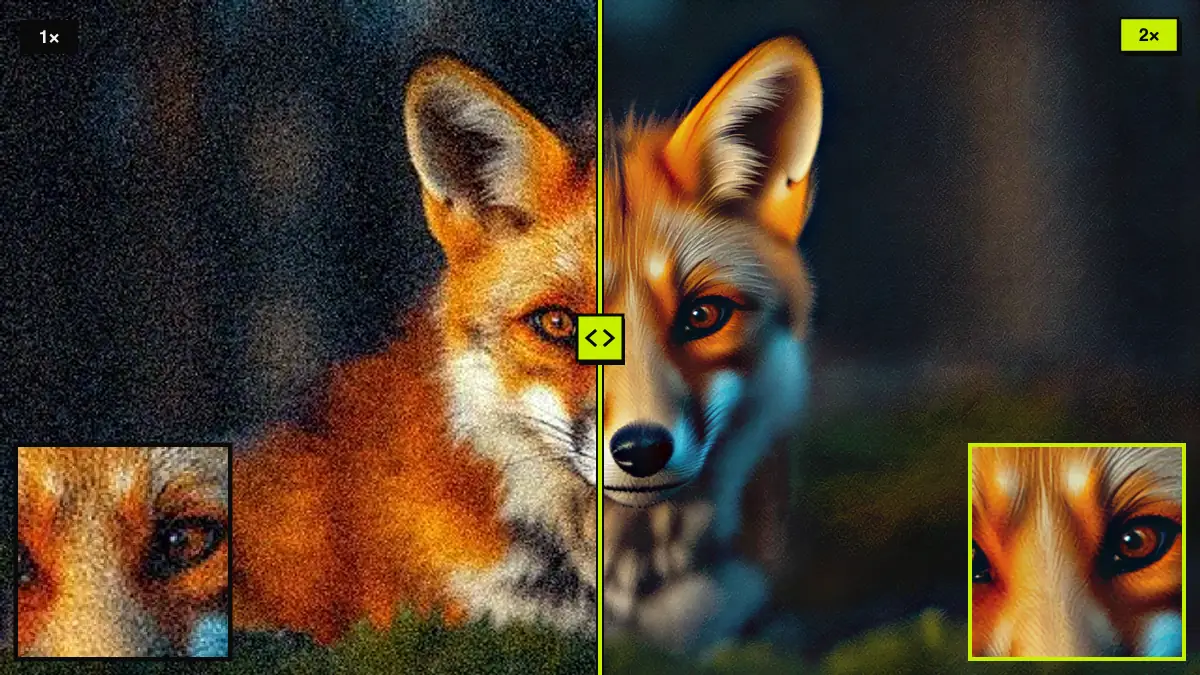
Concert halls, receptions, and dusk forests demand 1/500s–1/1000s shutter speeds that push cameras to ISO 6400+. Mastering how to denoise event photography alongside how to remove noise from wildlife photos requires keeping lace veils and plumage crisp while scrubbing blotchy bokeh clean.
- Expose to the Right (
ETTR): Feed the sensor maximum photons without clipping white fur or bridal highlights. - Clean before cropping: Full uncropped bokeh gives neural estimators accurate background statistics — vital for how to make a photo less grainy, how to denoise photos, and how to remove grain from photo telephoto bursts.
3. Exact Lightroom, Photoshop & Mobile Slider Settings
Dialing in manual sliders for how to reduce noise in photos or how to make photos less grainy? Use these tested ceilings:
- Lightroom / Camera Raw: On RAW (
DNG/CR3/ARW/NEF), set AI Denoise Amount35–55(65+erases pores). On JPEGs, set Luminance25–45, Detail50, Color25, and holdAlt/Optionon sharpening Masking30–60so flat skies stay unsharpened — ideal for how to fix a grainy photo and how to reduce noise in your photos. - Photoshop (
Filter → Noise → Reduce Noise): Use a Smart Object at Strength6–8, Preserve Details60%, Reduce Color Noise50%, masking eyes and lips back at30%for how to remove noise from image and how to denoise images. - iPhone, Snapseed & Lightroom Mobile: Checking what is denoise on iOS? Keep iPhone Photos Noise Reduction at
20–40, or Lightroom Mobile at Color25/ Luminance25–35when tackling how to make a picture less grainy or how to fix grainy pictures.
Real Camera Grain vs. 2026 AI Artifacts & Adversarial Cloaking
In 2026, knowing what is image noise and how to make photos less grainy carries an ironic twist: real optical grain distinguishes genuine photography from synthetic renders, so scrubbing portraits 100% smooth can make real skin look AI-generated.
- Optical Grain vs. Diffusion Tell-Tales: Benchmarks on how to detect ai generated images common artifacts 2026 note that authentic photon static intensifies in dark shadows (
SNRdrop) and stays isotropic. Synthetic diffusion outputs or over-filtered selfies show waxy poreless cheeks, warped background text, mismatched catchlights, or uniform midtone latent stippling. Leaving10%–15%subtle monochrome grit during how to fix grainy images or how to remove noise from photo edits preserves human realism. - Adversarial Cloaking (
Glaze&Nightshade): Spot faint contour ripples across digital illustrations and wonder what's image artifacting to confuse AI? Tools like Glaze and Nightshade embed targeted adversarial pixel perturbations to block style mimicry and unauthorized training. Because neural denoisers reconstruct local pixels, artists should always clean or upscale first, applying adversarial cloaking as the final export step.
Frequently Asked Questions
What does denoise mean in photo editing, and what does denoise do?
Here, denoise meaning is stripping random brightness grit and color blotches while keeping edges sharp. Asking what is denoise versus blur? Spatial sliders average neighbor pixels until skin smears, whereas neural networks learn what is denoising structurally so eyelashes and wool stay crisp.
Why are my photos so grainy indoors, and why does my photo look grainy even in daylight?
Dim rooms starve small sensors of photons, forcing high ISO gain that boosts circuit static. Daylight shots turn gritty when lifting dark shadows +2 to +3 EV, cropping on digital zoom, or re-saving JPEGs. Knowing what is noise in a photo — low SNR — guides clean fixes.
What is the fastest way to learn how to make photos less grainy online without plastic skin?
Upload JPG, PNG, or WebP (up to 20 MB) to SuperResolution's 1-click AI Photo Enhancer to clear grit, blotches, and JPEG blocks up to 2× (16 MP). Claim 48 free credits (no card) to test how to fix grainy photos, or unlock lossless PNGs for how to remove grain from a photo.
Why do my pictures look grainy on my phone, and how do I clean them on iPhone or Android?
Phones use small 1/1.3-inch sensors and crop digitally between lenses (2.5× or 7× zoom), magnifying static. For a pocket fix on how to make a photo less grainy or how to fix grainy pictures, set iPhone Noise Reduction to 20–40, or Lightroom Mobile to Color 25 and Luminance 30.
Should I clean grain before or after upscaling when deciding how to fix a grainy photo for print?
Clean speckle before enlarging, or upscalers magnify grit 4×–16×. Applying true denoise meaning first — clearing static before 2×/4× upscaling for 300 DPI prints — is essential for how to remove grain from photos and how to fix grainy images.
Can you still figure out how to make a photo less grainy if you only have a JPEG instead of RAW?
Yes. RAW tools need DNG, CR3, ARW, or NEF files, whereas perceptual browser AI handles 8-bit JPEGs and WebP directly. Keeping 10%–15% brightness texture when applying how to make photos less grainy or how to remove grain from photo exports prevents waxy skin.
Enhance Your Photos Now
AI photo enhancement — sign up free to get 48 credits.
Try SuperResolution Free →