What Does Super Resolution Do: AI, VSR & Monitor Guide
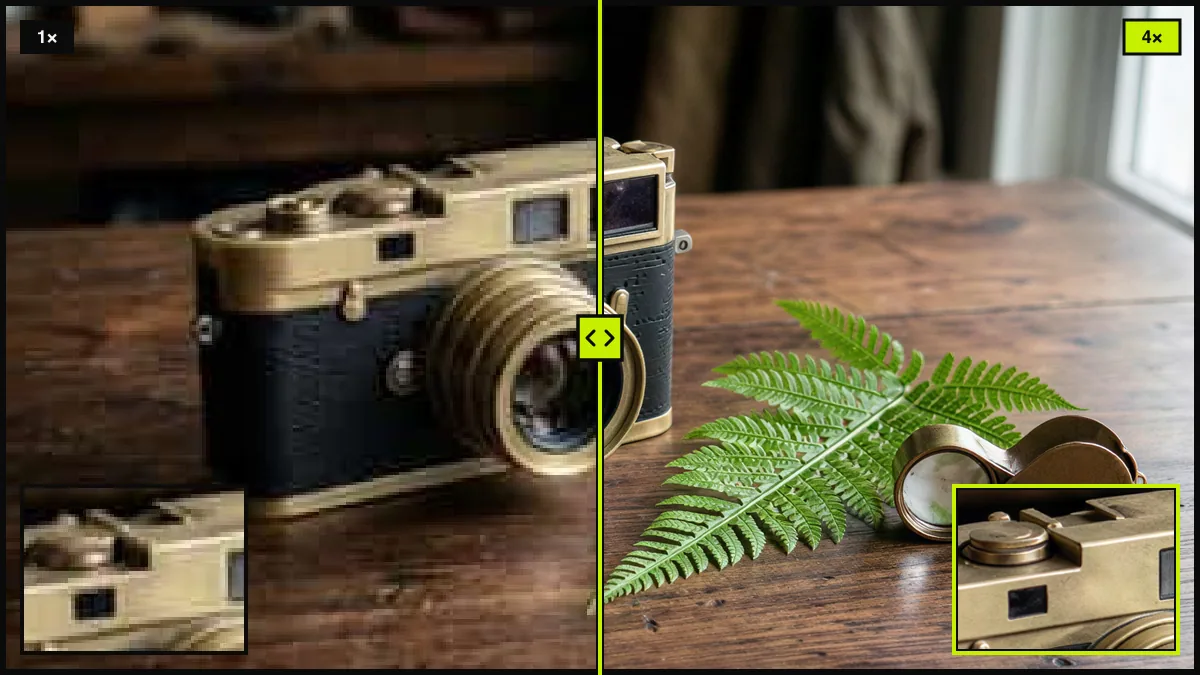
Ask three people "what does super resolution do" and you will often get three completely different answers. A photographer will tell you it turns a tiny 1-megapixel crop into a sharp 16-megapixel print. A PC gamer will tell you it renders games at 4K on a 1080p monitor. Someone adjusting an LG or Dell display menu will tell you it makes desktop fonts look strangely outlined with white halos.
All three are right, because the hardware and software industries use the same label for five distinct image pipelines.
This practical AI image super resolution guide breaks down what each version does under the hood, clarifies what Virtual Super Resolution is, answers whether you should have Super Resolution on (and what Super Resolution should be set at on monitors, GPUs, and photo tools), and compares the best free photo-editing tools available in 2026.
What Does Super Resolution Do Across Photos, GPUs & Monitors?
At its core, super resolution aims to deliver higher spatial detail than a standard pixel stretch can provide. How that detail is produced (and whether it increases output dimensions, sharpens existing edges, or downsamples a larger render) depends entirely on where you encounter the setting:
| Technology Type | Where You See It | What It Actually Does | Uses AI? | Recommended Setting |
|---|---|---|---|---|
| Single-Image AI Super-Resolution | SuperResolution, Lightroom, Photoshop, Upscayl | Predicts and synthesizes new high-frequency pixels (skin, hair, fabric, text) to enlarge still photos 2×–16× | Yes (CNN, Transformer & diffusion networks) | 2× for web/4K screens; 4× for 300 DPI prints |
| Virtual Super Resolution (VSR / DSR) | AMD Adrenalin (VSR), NVIDIA Control Panel (DSR / DLDSR) | Renders games higher than your monitor (e.g., 4K) and downsamples to native screen size to erase jagged edges | No (VSR / DSR); Yes (DLDSR Tensor Cores) | On (VSR 1440p/4K or DLDSR 1.78×–2.25×) only in older games with spare GPU FPS |
| Real-Time Game Upscaling | NVIDIA DLSS, AMD FSR / RSR, Intel XeSS, Windows Auto SR | Renders game frames lower (e.g., 1080p/1440p) and reconstructs 4K output for much higher frame rates | Yes (DLSS, XeSS, FSR 4, Auto SR); No (FSR 1–3, RSR) | Quality mode at 1440p/4K; Balanced on handhelds |
| Monitor & TV OSD Super Resolution | LG Super Resolution+, Dell, ASUS VividPixel, BenQ, Samsung | Applies a hardware unsharp-mask contrast boost along high-contrast pixel edges in real time | No (spatial FIR sharpening filter on display scaler) | Off (0) for native PC/Mac use; Low (1) for 720p/1080p TV boxes |
| Multi-Frame Camera Super-Resolution | Google Pixel Super Res Zoom, Olympus / Hasselblad High-Res Shot | Captures a burst of slightly shifted frames via hand tremor or IBIS sensor shift and merges sub-pixel samples | Hybrid (optical alignment + neural demosaicing) | Automatic on telephoto zoom or tripod High-Res mode |
Understanding which row applies to your screen or workflow immediately prevents the two most common mistakes: turning on a monitor's OSD sharpener during photo editing, or expecting a basic resizing slider to recover lost texture.
How Does AI Image Super-Resolution Work? (Bicubic vs. Neural Synthesis)
When photographers and designers ask how AI image super-resolution works, the clearest way to see the difference is to compare classical math against learned visual priors.
Why Standard Resizing Turns Soft and Blocky
Suppose you enlarge a 600×400 image by 4× to 2400×1600 in a standard editor. Every single input pixel must now cover a 4×4 grid (16 pixels). Traditional bilinear, bicubic, or Lanczos interpolation calculates new pixel colors strictly by averaging nearby pixels:
- Zero new high-frequency information is added: sharp diagonal rooflines turn into stair-steps, and eyelashes blur into smudges.
- Compression flaws get magnified 4×: if the source JPG has
8×8macroblock seams or mosquito ringing around letters, bicubic resizing enlarges those artifacts right alongside the subject.
How Neural Super-Resolution Reconstructs Detail
Deep-learning super-resolution models (spanning residual convolutional networks like Real-ESRGAN, vision transformers like SwinIR, and modern latent diffusion upscalers like SeedVR) are trained on millions of paired photographs: pristine high-resolution originals paired with degraded, downsampled, noisy counterparts.
Instead of averaging neighbor pixels, the neural network recognizes structural patterns such as woven linen, brick mortar, iris catchlights, brushed metal, and serif typography, then predicts the most probable high-frequency detail while stripping JPEG compression noise at the same time:
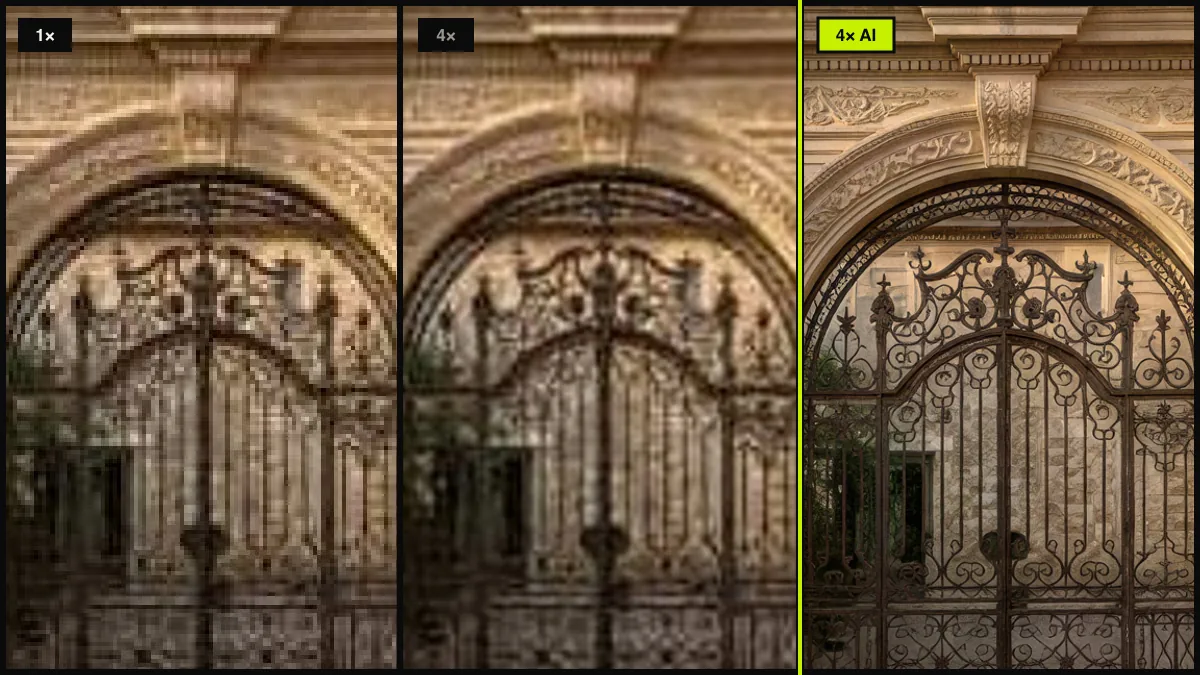
2×Super-Resolution (4×total pixels): Turns a1080p(1920×1080,2.07 MP) snapshot into a razor-sharp4K UHD(3840×2160,8.29 MP) image.4×Super-Resolution (16×total pixels): Converts a1 MP(1024×1024) AI generation or cropped portrait into a16.8 MP(4096×4096) file ready for a crisp13.7×13.7 in(34.7×34.7 cm) print at300 DPI.8×–16×Super-Resolution (up to34 MP / ~8K): Rebuilds tiny legacy web thumbnails, archival crops, or product icons on our flagship 2×–16× AI Super Resolution upscaler.
Honest Physical Boundaries
Neural reconstruction is powerful, not magic. Because it predicts texture from visible pixel gradients, it cannot recover legible characters from 3-pixel-tall blurred micro-type, undo severe camera-shake streaks, or pull detail out of solid RGB(0,0,0) clipped black shadows. Match the tool to the defect:
- Already large photo that looks slightly soft or noisy? Use the 1-click AI Photo Enhancer (up to
2× / 16 MP). - Underexposed indoor shot or backlit silhouette? Lift shadows without clipping skies first in our AI Image Brightener (
~1 MPlossless PNG output), then pass the result to2×/4×upscaling if you need 4K or print sizes. - Scanned paper print with creases, dust, or silvering? Repair physical damage in AI Old Photo Restoration.
Is Super Resolution AI? Separating Shaders, Optics, and Neural Nets
Because television brands coined the marketing phrase long before deep learning went mainstream, searchers frequently ask: is super resolution AI?
The honest answer is sometimes, depending on the pipeline:
- Non-AI Spatial Filters & Supersampling: Monitor OSD "Super Resolution" modes (LG, Dell, BenQ, ASUS), AMD's classic Virtual Super Resolution (VSR), NVIDIA legacy DSR, and AMD Radeon Super Resolution (RSR) / FSR 1–3 do not use neural networks. They rely on fast deterministic Lanczos/edge-adaptive shaders, unsharp masking, or motion-vector temporal accumulation.
- Optical Multi-Frame Super-Resolution: Astronomy stacks, micro-stepper studio cameras, and sensor-shift "High Res Shot" modes on mirrorless bodies merge real optical sub-pixel offsets from 4 to 16 exposures, relying on physical light sampling rather than generative AI.
- True AI Neural Super-Resolution: Single-image photo upscalers (AI Image Upscaler, Adobe Camera Raw Super Resolution, Topaz, Real-ESRGAN), NVIDIA DLSS / DLDSR, Intel XeSS, AMD FSR 4, Windows Auto SR, and RTX Video Super Resolution run trained neural weights on GPU Tensor or NPU cores to infer missing detail.
What Is Virtual Super Resolution (AMD VSR & NVIDIA DSR)?
If you spotted the toggle inside AMD Software: Adrenalin Edition (Settings → Display → Virtual Super Resolution), you might wonder what Virtual Super Resolution is and what it actually does compared to photo upscaling.
Virtual Super Resolution (VSR) works in the exact opposite direction of an image upscaler:
- Internal Oversampling: Suppose you own a
1920×1080(1080p) monitor. Turning VSR On unlocks virtual higher resolutions (2560×1440or3840×2160) inside your Windows display settings and in-game video menus. - GPU Downsampling to Native Pixels: Your graphics card renders the entire 3D frame at
4K(8.29 millionpixels) in VRAM and scales it down to your physical1080p(2.07 millionpixels) panel before display. - Why Gamers Use It: Downsampling acts as full-scene Supersampling Anti-Aliasing (SSAA). Fine chain-link fences, distant power lines, foliage, and hair shimmer far less than at native 1080p, especially in older DirectX 9/11 titles (
GTA V,Mass Effect, classic strategy games) that lack modern anti-aliasing. NVIDIA offers the same concept as DSR (smoothness-filtered math) and DLDSR (1.78×and2.25×AI-assisted downsampling that matches 4K DSR clarity at much lower GPU cost).
Crucial trade-off: Rendering internal 4K cuts your frame rate by 50%–70% and increases GPU power draw and VRAM usage. VSR also cannot add physical pixels to your monitor: small desktop UI menus can look slightly soft on non-integer ratios (1440p → 1080p is 1.33×), whereas 4K → 1080p (2.0× integer axis ratio) maps cleanly.
Should I Have Super Resolution On? What Should Super Resolution Be Set At?
Whether you should have Super Resolution on (and what Super Resolution should be set at) depends on the hardware in front of you:
1. Monitor & TV Menus (LG Super Resolution+, Dell, ASUS, BenQ, Samsung)
- Desktop PC, Mac, Coding, Office Text & Photo Editing → Set to
Off(0): At native HDMI/DisplayPort resolution (1080pon1080p,4Kon4K), every pixel already maps 1:1. EnablingMediumorHighcreates bright white halo outlines around black letters, adds gritty ringing to gradients, and misleads you while editing photos. - 1080p Console (Nintendo Switch) or Cable TV on a 4K Screen → Set to
Low(Level 1/10–20%): A gentleLowpass counteracts upscale softness without introducing artificial double contours. AvoidHigh(Level 3).
2. AMD & NVIDIA GPU Drivers (VSR / DLDSR vs. DLSS / FSR)
- Older or Lightweight Games (FPS well above monitor Hz) → Turn AMD
VSR(3840×2160on 1080p) or NVIDIADLDSR(2.25×, Smoothness33%–50%) ON: Enjoy clean, alias-free edges using idle GPU headroom. - Demanding AAA Games at 1440p / 4K → Keep
VSROFF; set in-gameDLSS/FSR/XeSStoQuality: You gain 35%–60% higher frame rates with near-native clarity.
3. Browser Video (NVIDIA RTX Video Super Resolution & Edge Video SR)
- Desktop PC on AC Power →
On(Level 2orAuto): Cleans blocky720p/1080pYouTube, Twitch, and archived web streams on1440p/4Kmonitors. - Laptop on Battery →
Off: Continuous GPU video inference drains laptop batteries rapidly.
4. Still Photo Editing & Print Preparation
- Web, E-Commerce Zoom & 4K Wallpaper → Set to
2×: Doubles width and height cleanly in our stepped 2×/4× AI Image Upscaler. - 8×10, A4, Poster Printing & 1024×1024 AI Art → Set to
4×: Multiplies total pixels16×(up to25 MPin Increase Photo Resolution, or8×–16×up to34 MPon the homepage Super Resolution tool) to satisfy300 DPIprint shop requirements.
Free Tools Available to Work with Super Resolution in Photo Editing
When comparing free tools to work with super resolution in photo editing, your best choice comes down to whether you want instant cloud-GPU browser convenience or offline open-source desktop software running on your own graphics card:
| Tool | Platform | Scale Options | Free Access & Limits | Best Photo-Editing Fit |
|---|---|---|---|---|
| SuperResolution | Any browser (iOS, Android, Mac, Windows) | 2×–16× (up to 34 MP / 8K) + 1-click tools | 48 free signup credits (no card, valid 7 days; watermarked preview; packs/Pro unlock clean PNG) | Fast, natural skin/text/product detail on any device with zero GPU or install required |
| Upscayl | Desktop app (Windows, macOS, Linux) | 2×, 3×, 4× (up to 16× double-pass) | 100% free & open-source (AGPLv3, offline, no watermark) | Batch local upscaling of illustrations, anime, and general photos if you own a Vulkan GPU |
| ChaiNNer + Real-ESRGAN / SwinIR | Desktop node GUI / CLI (Win, Mac, Linux) | Custom model scales (2×, 4×) | 100% free & open-source (requires downloading PyTorch/NCNN weights) | Technical editors wanting granular tile-size, model-blending, and batch pipeline control |
| GIMP + G'MIC-Qt | Desktop editor (Win, Mac, Linux) | LoHalo/NoHalo resize + G'MIC edge-directed upscale filters | 100% free & open-source | Combining classical multi-scale sharpening, layer masks, and manual retouching in one free editor |
| RawTherapee / Darktable | Desktop RAW developer (Win, Mac, Linux) | RAW demosaic & Diffuse/Sharpen modules | 100% free & open-source | Extracting maximum optical sensor detail from camera RAW files (.CR3, .NEF, .ARW) before export |
Practical Workflow Tip for Cleanest Photo Results
Regardless of which photo tool you pick, follow three rules that professional retouchers rely on:
- Upscale the original source file, never a screenshot: Feeding the neural network your earliest JPG, PNG, or WebP export (rather than a re-compressed chat screenshot) avoids baking messaging-app blocks into the reconstruction.
- Run one pass at your target scale: One clean
4×pass produces sharper micro-contrast than chaining two separate2×passes. - Inspect at
100%zoom before printing: Check eyes, typography edges, and fine fabric weave using a side-by-side slider. You can test your own file in under 10 seconds with 48 free credits on our 2×/4× AI Image Upscaler or compare more options in our 7 Best Free AI Photo Enhancers benchmark.
Frequently Asked Questions
What does super resolution do in plain English?
Super resolution reconstructs sharper, higher-detail output from lower-resolution visual data instead of simply stretching existing pixels. In photo editing, AI neural networks synthesize new pixels at 2× to 16× scale; on monitors and TVs, hardware filters sharpen soft non-native video edges; and in GPU drivers (Virtual Super Resolution), games render above native screen resolution and downsample for cleaner anti-aliasing.
Is super resolution AI, or is it a regular filter?
It depends on the product. Modern photo upscalers (such as SuperResolution, Lightroom Super Resolution, and Real-ESRGAN), NVIDIA DLSS/DLDSR, and RTX Video Super Resolution use deep-learning neural networks. By contrast, built-in monitor 'Super Resolution' menus (LG, Dell, ASUS, BenQ) and AMD Virtual Super Resolution (VSR) use deterministic mathematical scaling and edge-contrast filters rather than AI.
What does Virtual Super Resolution do on AMD and NVIDIA GPUs?
AMD Virtual Super Resolution (VSR) and NVIDIA Dynamic Super Resolution (DSR) let your graphics card render games internally at a higher resolution, such as 1440p or 4K, and downsample each frame to fit a 1080p or 1440p monitor. This acts as full-scene supersampling anti-aliasing, smoothing jagged power lines and shimmering foliage when you have spare GPU headroom.
Should I have Super Resolution on or off on my monitor?
Keep your monitor's built-in Super Resolution OFF (0) when using a PC or Mac at native resolution, because turning it up adds white ringing halos around desktop text and distorts photo-editing accuracy. Only set it to Low (Level 1) when feeding a lower-resolution 720p or 1080p console, cable box, or Blu-ray signal into a 4K screen.
What should Super Resolution be set at for gaming, video, and photos?
On monitors: Off (0) for native PC desktops, or Low (1) for 720p/1080p console inputs. In GPU drivers: enable AMD VSR (1440p/4K) or NVIDIA DLDSR (1.78×/2.25×) only for older games with spare FPS, or use DLSS/FSR 'Quality' mode for demanding 4K titles. For photo editing: use 2× for crisp 4K web displays and 4× to hit 300 DPI print density.
What are the best free tools to use super resolution in photo editing?
In a browser with zero install, SuperResolution gives every new account 48 free signup credits (no card required) to test 2×–16× AI upscaling on your own photos. For free offline desktop processing on your own GPU, Upscayl and ChaiNNer (wrapping open-source Real-ESRGAN models) run on Windows, macOS, and Linux without watermarks.
Enhance Your Photos Now
AI photo enhancement — sign up free to get 48 credits.
Try SuperResolution Free →